Overview
airpx is a multi-provider AI gateway that exposes 24 public models from 22 providers through a single, unified API. It is fully compatible with both the OpenAI and Anthropic APIs, so you can use it as a drop-in replacement in any tool or SDK that supports those formats.
Key features: high availability with resilient request handling, per-model pricing with token-level billing, streaming with SSE, tool/function calling, thinking/reasoning support, and a growing catalog of models. All models are prepaid — top up a balance to use them; see GET /v1/models for the live catalog and pricing.
Base URL (OpenAI-compatible): https://airpx.cc/v1 — Base URL (Anthropic-compatible): https://airpx.cc
Quick Start
Sign up, create a key, top up, then call.
No card, no invite — get started in about a minute: 1. Sign up at https://airpx.cc/signup with email + password. 2. Create an API key in the dashboard at https://airpx.cc/keys (keys start with sk-proxy-*). 3. Top up your prepaid balance at https://airpx.cc/billing — a balance is required before your first call (there is no free tier). 4. Set your base URL to https://airpx.cc/v1 (OpenAI) or https://airpx.cc (Anthropic) and send your first request:
curl https://airpx.cc/v1/chat/completions \
  -H "x-api-key: YOUR_KEY" \
  -H "Content-Type: application/json" \
  -d '{
    "model": "gpt-5.4-mini",
    "messages": [{"role": "user", "content": "Hello!"}]
  }'
That's it. `gpt-5.4-mini` is just an example — see GET /v1/models for the full catalog and live pricing. Every request deducts from your prepaid balance; check or top up your balance at https://airpx.cc/billing.
Authentication
All /v1/* proxy endpoints accept your API key via one of two headers.
Pass your proxy key (starts with sk-proxy-*) in either header: • x-api-key: YOUR_KEY • Authorization: Bearer YOUR_KEY Both headers are interchangeable. Use whichever your tool or SDK supports.
Important: proxy keys (sk-proxy-*) are used for /v1/* endpoints only. They are NOT the same as dashboard login tokens.
curl https://airpx.cc/v1/chat/completions \
  -H "x-api-key: sk-proxy-abc123" \
  -H "Content-Type: application/json" \
-d '{"model": "gpt-5.4-mini", "messages": [{"role": "user", "content": "Hi"}]}'API Reference
Public proxy endpoints. All require a valid API key.
The complete, always-current API reference is generated from the server itself — every endpoint, request/response schema, and parameter. Use the interactive Swagger UI to explore and try requests, or the raw OpenAPI spec to generate clients. These are the single source of truth; the list below is just a quick orientation.
Which endpoint should my client use? Pick by wire format — but note that ANY model works through ANY wire, because the gateway bridges between them:
- Anthropic /v1/messages — Claude Code and Anthropic SDKs.
- OpenAI /v1/chat/completions — aider, Cursor, Cline, Goose, most OpenAI-compatible tools.
- OpenAI /v1/responses — Codex CLI and other Responses-API clients.
- Gemini /v1beta/models/{model}:generateContent — Gemini CLI and native-Gemini clients.
This is the key differentiator: send a request in whatever wire your client speaks and reach any model in the catalog. Run Claude or GPT inside Gemini CLI, native Gemini inside Codex, or DeepSeek inside Claude Code — thinking, tools and streaming are translated across formats. Few gateways offer all four ingress protocols at once (Anthropic Messages + OpenAI chat + OpenAI Responses + native Gemini generateContent).
Main endpoints (see /v1/docs for full request/response schemas):
/v1/chat/completionsChat completion (OpenAI format). Streaming supported./v1/messagesAnthropic Messages API (native format). Streaming supported./v1/messages/count_tokensCount input tokens before sending (Anthropic context preflight, used by Claude Code). Returns {"input_tokens": N}. For non-Claude models the count is an approximate estimate./v1/responsesOpenAI Responses API (Codex CLI). Streaming supported./v1beta/models/{model}:generateContentGemini generateContent (native Google format, non-stream). Auth via x-goog-api-key: YOUR_KEY or ?key=YOUR_KEY (your sk-proxy key). Any model works, not just Gemini./v1beta/models/{model}:streamGenerateContent?alt=sseGemini streaming generateContent (native SSE). Same x-goog-api-key / ?key= auth. Used by Gemini CLI./v1/modelsModel catalog with pricing and capabilities./v1/embeddingsText embedding generation (OpenAI format)./v1/audio/transcriptionsAudio transcription (Whisper-compatible)./v1/images/generationsImage generation./v1/exa/searchExa.ai web search proxy (uses your proxy key — no separate Exa key needed)./v2/videosCreate a video-generation job (poll GET /v2/videos/{id}).All endpoints accept JSON request bodies and return JSON responses. For streaming, set "stream": true and receive Server-Sent Events (SSE). See /v1/docs for the authoritative parameters and schemas.
Tool / function calling works on every model through every wire. Send OpenAI-style `tools` on /v1/chat/completions, or Anthropic `tools` with tool_use / tool_result blocks on /v1/messages — the gateway translates tool schemas and calls between formats, so tools work even when the model's native wire differs from your client's.
{
  "model": "gpt-5.5",
  "messages": [{"role": "user", "content": "Weather in Paris?"}],
  "tools": [{
    "type": "function",
    "function": {
      "name": "get_weather",
      "description": "Get current weather for a city",
      "parameters": {
        "type": "object",
        "properties": {"city": {"type": "string"}},
        "required": ["city"]
      }
    }
  }]
}Integrations
airpx is a drop-in backend for coding tools and AI agents. Two groups below: coding tools (IDE / CLI) and AI agents / chatbots. Each recipe is an API key + base URL + a public model id.
Coding tools (IDE / CLI) — add airpx as an OpenAI- or Anthropic-compatible backend, then use any public model id (e.g. claude-opus-4-8, claude-sonnet-4-6, gpt-5.5, gemini-3.5-flash, deepseek-v4-pro). Any model works in any agent regardless of the agent's wire format — the gateway bridges across Anthropic /v1/messages (Claude Code), OpenAI /v1/chat/completions (aider, Cursor, Cline, Goose), OpenAI /v1/responses (Codex), and Gemini /v1beta generateContent (Gemini CLI). So you can run native Gemini or Claude inside Codex, or GPT inside Gemini CLI — thinking, tools and streaming included.
Live-verified agent × model (real CLIs, clean-room Docker)
| Model | Claude Code | aider/Cursor | Codex | Gemini CLI |
|---|---|---|---|---|
| claude-sonnet-4-6 | ||||
| gpt-5.5 | ||||
| gemini-3.5-flash | ||||
| deepseek-v4-pro | ||||
| kimi-k2.6 | ||||
| glm-4.7 |
- claude-sonnet-4-6
- Claude Code
- aider/Cursor
- Codex
- Gemini CLI
- gpt-5.5
- Claude Code
- aider/Cursor
- Codex
- Gemini CLI
- gemini-3.5-flash
- Claude Code
- aider/Cursor
- Codex
- Gemini CLI
- deepseek-v4-pro
- Claude Code
- aider/Cursor
- Codex
- Gemini CLI
- kimi-k2.6
- Claude Code
- aider/Cursor
- Codex
- Gemini CLI
- glm-4.7
- Claude Code
- aider/Cursor
- Codex
- Gemini CLI
Representative models; last verified 2026-06-30. gpt-5.5 in Gemini CLI with tools is a client-side edge — use Codex/chat for gpt-5.5. Full catalog: GET /v1/models.
🔧Claude Code
- 1.Add environment variables to ~/.bashrc or ~/.zshrc
- 2.Run claude as usual
export ANTHROPIC_BASE_URL=https://airpx.cc
export ANTHROPIC_AUTH_TOKEN=sk-proxy-…
export ANTHROPIC_MODEL=claude-opus-4-8
# ANTHROPIC_API_KEY also works (the gateway accepts both).

# Then just run:
claude🔧Pi Coding Agent
- 1.Install Pi: npm i -g @earendil-works/pi-coding-agent (Node ≥ 22).
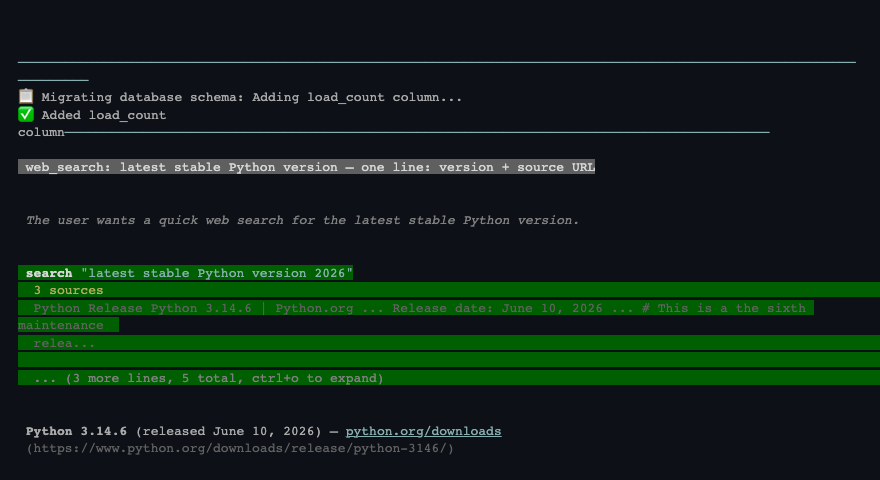
- 2.Install the plugins — Pi ships as a bare agent with none pre-installed, you add each yourself. pi install npm:pi-airpx is required (without it airpx models will NOT appear); pi-ext-int-search (web search), pi-resume (session resume) and claude-recall (memory) are optional add-ons.
Plugins in detail — what each does & npm links
Plugin What it does Required? pi-airpx Loads every airpx model into the /model picker with live prices/context — no hand-edited config. Required pi-ext-int-search Web search (cited) + fetch URLs/YouTube/GitHub + local code search; we host it, no extra keys. Optional pi-resume Instant session resume — /r1..r5 jump, /rs picker. Optional claude-recall Persistent memory across sessions — preferences & project context (local SQLite). Optional - What it does
- Loads every airpx model into the /model picker with live prices/context — no hand-edited config.
- Required?
- Required
- What it does
- Web search (cited) + fetch URLs/YouTube/GitHub + local code search; we host it, no extra keys.
- Required?
- Optional
- What it does
- Instant session resume — /r1..r5 jump, /rs picker.
- Required?
- Optional
- What it does
- Persistent memory across sessions — preferences & project context (local SQLite).
- Required?
- Optional
Install with `pi install npm:<name>`. Click a plugin name for its npm page. Only pi-airpx is required; the rest are optional add-ons.
- 3.If you previously installed pi-web-access, remove it first — pi-ext-int-search supersedes it and the two conflict (pi remove npm:pi-web-access).
- 4.Log in: run pi, then /login airpx and paste your sk-proxy-… key (saved once to ~/.pi/agent/auth.json; a wrong key is rejected immediately).
- 5.Pick a model: run /model and type a name — airpx models appear tagged [airpx], ready to select. No manual config. (If the picker is empty, quit and restart Pi so the freshly installed pi-airpx loads.)
npm i -g @earendil-works/pi-coding-agent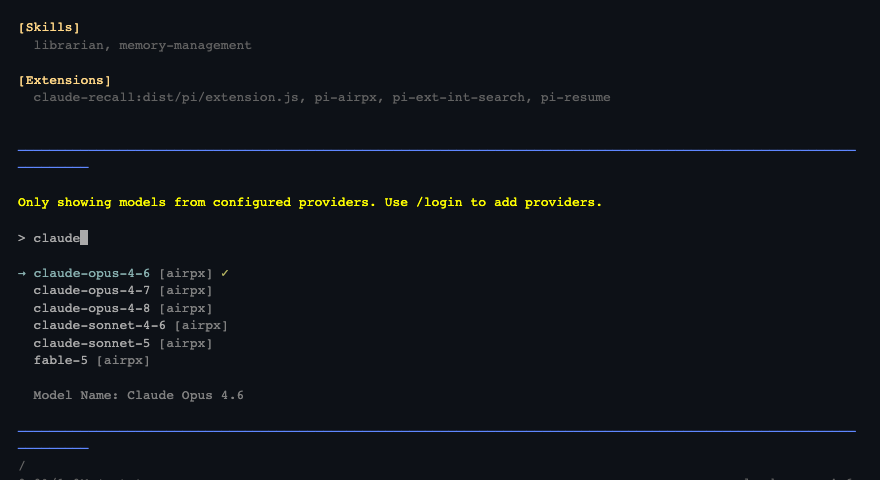
🔧Cursor
- 1.Open Settings → Models → OpenAI API Key + Base URL
- 2.Enter your airpx key, base URL, and a model
API Key: sk-proxy-…
Base URL: https://airpx.cc/v1
Model: claude-opus-4-8🔧Cline (VS Code)
- 1.Open extension settings → API Provider → OpenAI Compatible
- 2.Enter your airpx key, base URL, and a model
Base URL: https://airpx.cc/v1
API Key: sk-proxy-…
Model: claude-opus-4-8🔧Goose
- 1.Point the OpenAI provider at airpx (env vars below)
- 2.Run goose session
export GOOSE_PROVIDER=openai
export GOOSE_MODEL=claude-opus-4-8
export OPENAI_HOST=https://airpx.cc
export OPENAI_BASE_PATH=v1/chat/completions
export OPENAI_API_KEY=sk-proxy-…

goose session🔧Roo Code / Continue
- 1.Roo Code: pick the "OpenAI Compatible" provider, fill base URL + key + model
- 2.Continue: add an OpenAI-compatible model to ~/.continue/config.yaml
Base URL: https://airpx.cc/v1
API Key: sk-proxy-…
Model: claude-sonnet-4-6🔧Aider
- 1.Set OPENAI_API_BASE environment variable
- 2.Run aider with any supported model
export OPENAI_API_BASE=https://airpx.cc/v1
export OPENAI_API_KEY=sk-proxy-…

aider --model openai/claude-opus-4-8🔧OpenCode
- 1.Install: npm install -g opencode-ai
- 2.Add a custom provider `o` to ~/.config/opencode/opencode.json
- 3.Run opencode and pick a model with /models
npm install -g opencode-ai🔧Codex CLI
- 1.Add the airpx provider block to ~/.codex/config.toml
- 2.Export OPENAI_API_KEY and run codex
model = "gpt-5.5"
model_provider = "airpx"

[model_providers.airpx]
name = "airpx"
base_url = "https://airpx.cc/v1"
wire_api = "responses"
env_key = "OPENAI_API_KEY"

# Codex requires a Responses-API model (e.g. gpt-5.5); wire_api must be "responses".🔧Gemini CLI
- 1.Point Gemini CLI at airpx with GOOGLE_GEMINI_BASE_URL (root, no /v1) + your sk-proxy key as GEMINI_API_KEY
- 2.Enable the CLI's external/gateway auth once in ~/.gemini/settings.json
- 3.Run with -m <model> — reach ANY model (Gemini, Claude, GPT, DeepSeek) via the native generateContent endpoint
export GOOGLE_GEMINI_BASE_URL=https://airpx.cc
export GEMINI_API_KEY=sk-proxy-…

# Gemini CLI's gateway auth needs external-auth enabled once:
mkdir -p ~/.gemini
echo '{"security":{"auth":{"useExternal":true}}}' > ~/.gemini/settings.json

# Any model id works — not just Gemini ( --skip-trust for headless -p ):
gemini -m gemini-3.5-flash --skip-trust -p "What is 12 × 12?"
gemini -m claude-opus-4-8  --skip-trust -p "Refactor this function"
gemini -m gpt-5.5          --skip-trust -p "Explain async/await"
AI agents & chatbots — point any OpenClaw / Hermes-style agent at airpx via the OpenAI (/v1) or Anthropic-compatible path.
🤖OpenClaw / Hermes & other agents
- 1.OpenAI-style agents: set the base URL + key + a model id
- 2.Anthropic-style agents: point ANTHROPIC_BASE_URL at airpx (root, no /v1)
export OPENAI_BASE_URL=https://airpx.cc/v1
export OPENAI_API_KEY=sk-proxy-…
# model: gpt-5.5 · claude-opus-4-8 · gemini-3.5-flash · deepseek-v4-proSDKs
Use standard OpenAI and Anthropic SDKs — just point them at airpx.
pip install openai

from openai import OpenAI

client = OpenAI(
    base_url="https://airpx.cc/v1",
    api_key="YOUR_KEY"
)

r = client.chat.completions.create(
    model="gpt-5.4-mini",  # e.g.; see GET /v1/models
    messages=[{"role": "user", "content": "Hello!"}]
)
print(r.choices[0].message.content)Models
airpx exposes 24 public models across 22 providers. Browse the live catalog at /v1/models.
The model catalog is available at GET /v1/models and returns all active models with their pricing, capabilities, and provider information.
All models are prepaid — billed per 1M tokens with separate rates for input, output, cache read, and cache write tokens. Live per-model pricing is in GET /v1/models (if a free tier is ever added, those models show $0 there). Check the live catalog and rates at GET /v1/models rather than a hardcoded list.
curl https://airpx.cc/v1/models \
-H "x-api-key: YOUR_KEY"Billing
Prepaid balance with token-level billing.
airpx uses a prepaid balance model. You top up your balance in the dashboard, and each request deducts the cost based on actual token usage and the model's pricing.
Billing is calculated per request based on: • Input tokens × model input price (per 1M tokens) • Output tokens × model output price (per 1M tokens) • Cache read tokens × cache read price • Cache write tokens × cache write price Your balance is checked before each request. If insufficient, the request is rejected with an "Insufficient balance" error (HTTP 429) before it runs — top up at https://airpx.cc/billing.
All models are prepaid — every request deducts from your balance, so you must top up before your first call. You can top up from $1 by card, SBP, or crypto, and your balance never expires. Top up and check your balance at https://airpx.cc/billing. Live per-model pricing is in GET /v1/models.
Streaming
Both OpenAI and Anthropic formats support real-time streaming via Server-Sent Events (SSE).
Set "stream": true in your request body to receive incremental responses. The proxy streams directly from the upstream provider, preserving the original SSE format for both OpenAI and Anthropic protocols.
{
  "model": "gpt-5.4-mini",
  "stream": true,
  "messages": [{"role": "user", "content": "Hello!"}]
}
Thinking / reasoning is also supported. Use reasoning_effort (OpenAI style) or thinking: {type: "enabled", budget_tokens: N} (Anthropic style). Responses include reasoning_content or thinking blocks accordingly.
{
  "model": "claude-opus-4-8",
  "reasoning_effort": "high",
  "stream": true,
  "messages": [{"role": "user", "content": "Solve this step by step..."}]
}
Reasoning controls: OpenAI-style reasoning_effort accepts low | medium | high; Anthropic-style thinking takes {"type": "enabled", "budget_tokens": N}. The gateway maps between them, so a reasoning model responds to whichever your client sends. Per client: Pi uses --thinking off|low|medium|high, OpenCode uses --variant, and Claude Code / Codex pass their own thinking settings through automatically.
Bring Your Own Key
Use your own provider API keys, with one clean airpx key per employee.
Add multiple of your own provider keys — OpenAI, Anthropic, Google, and others — from the dashboard. Requests routed through BYOK are billed directly by your provider; airpx keeps the OpenAI/Anthropic-compatible gateway in front.
For B2B teams, issue each employee one airpx key instead of sharing raw provider keys. You keep model access, limits, and usage visible per employee key. Your own provider keys are never shared with other users.
Billing: when a request is served by YOUR OWN provider key, it is NOT debited from your prepaid airpx balance — your provider bills you directly. Requests served from the shared airpx pool are billed from your airpx balance as before.
Spending caps: set a spending cap (in USD) per app-key over a period — day, week, or month. Manage caps on the BYOK page at https://airpx.cc/byok. The cap is a SOFT cap: it is measured as each request settles, so usage may briefly exceed the cap before new requests are blocked. BYOK spend counted toward a cap is an ESTIMATE at airpx pricing — your provider's real bill is authoritative.
Fallback control (allow_pool_fallback, default OFF): when OFF, once the cap is reached — or the provider key fails — new requests are PAUSED until the cap period resets. When ON, requests fall back to the shared airpx pool and bill your airpx balance, so if your airpx balance is $0 they will fail (top up at https://airpx.cc/billing).
Each user can hold a limited number of app-keys (default 5, configurable by the operator).
Spend visibility: the BYOK page shows a per-provider-key budget summary and an expandable spend breakdown per app-key (cap, spent, remaining, tokens, requests), with a day / week / month analytics window.
Self-service introspection: a client can GET /v1/key (alias /key/info) with its own app-key to read its own, non-secret status — name, spend_cap_usd, cap_period, usage_period (spent this period), remaining, reset_at, provider_key (a non-secret label of the linked provider key, never the raw key), allow_pool_fallback, and allowed_models. This is read-only and makes NO model call.
curl https://airpx.cc/v1/key \
-H "Authorization: Bearer sk-proxy-YOUR_KEY"Limits & Errors
HTTP status codes and common error scenarios.
The proxy returns standard HTTP status codes. The most common ones and how to resolve them are below.
Rate limits depend on your account tier and key configuration. If you hit a 429, check the message: a true rate limit clears after a short backoff, but an "Insufficient balance" message means you need to top up in the dashboard.
Common HTTP statuses and how to resolve them
| Status | Meaning | Fix |
|---|---|---|
| 401 | Invalid or missing API key | Send a valid sk-proxy-* key in x-api-key or Authorization: Bearer — no stray spaces or quotes. |
| 402 | Insufficient balance | Top up your prepaid balance at https://airpx.cc/billing (some balance errors also surface as 429 — read the message). |
| 403 | Model not allowed for your key or tier | Use a model available to your tier — see GET /v1/models for the ids your key can call. |
| 429 | Rate limit / quota / low balance | Back off and retry with jitter; if the message mentions balance, top up instead. |
| 500 / 502 / 503 | Transient upstream or proxy error | Retry shortly — these are usually transient. |
| 504 / 524 | Long request timed out | Retry, or reduce max_tokens / prompt size; use streaming for long generations. |
- 401
- Meaning
- Invalid or missing API key
- Fix
- Send a valid sk-proxy-* key in x-api-key or Authorization: Bearer — no stray spaces or quotes.
- 402
- Meaning
- Insufficient balance
- Fix
- Top up your prepaid balance at https://airpx.cc/billing (some balance errors also surface as 429 — read the message).
- 403
- Meaning
- Model not allowed for your key or tier
- Fix
- Use a model available to your tier — see GET /v1/models for the ids your key can call.
- 429
- Meaning
- Rate limit / quota / low balance
- Fix
- Back off and retry with jitter; if the message mentions balance, top up instead.
- 500 / 502 / 503
- Meaning
- Transient upstream or proxy error
- Fix
- Retry shortly — these are usually transient.
- 504 / 524
- Meaning
- Long request timed out
- Fix
- Retry, or reduce max_tokens / prompt size; use streaming for long generations.